
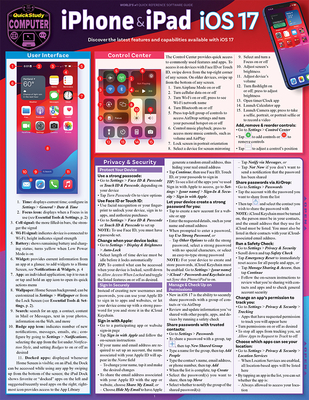
iPhone & iPad IOS 17: A Quickstudy Laminated Reference Guide
| AUTHOR | Kepler, Jennifer |
| PUBLISHER | Quickstudy Reference Guides (11/01/2023) |
| PRODUCT TYPE | Other (Other) |
Description
Don't miss out on the features that make your devices even more powerful, easier to use, better organized and more secure. Know what changed and how to use the new features you need all in one place versus multiple pages of multiple websites. This quick reference focuses on core features and how to use them along with the new and expanded features we use the most. Pushing the limits of organization, messaging, screen space, usability, security, photography and privacy into the future. This 6-page laminated guide is jam-packed with the most relevant uses of your device, some of which you may not know are even there. Whether you are using your Apple device for school, personal, or business use, ensure you are taking advantage of your device's fullest potential. Screen shots and icons are included, along with clear and concise instructions in our durable, highly portable, colorful design where you can always find answers fast.
6 page laminated guide includes:
6 page laminated guide includes:
- User Interface
- Control Center
- Privacy & Security
- Protect Your Device
- Sign In Securely
- Manage & Check Up on Permissions
- Omit Location Data from Photos & Videos
- Locate a Lost Device with Find My
- Add an Account Recovery or Legacy Contact
- Create a Medical ID for Emergencies
- Essential Tools & Settings
- Contact Posters
- Live Voicemail
- StandBy Mode
- Custom Lock Screens
- Focus
- NameDrop
- Live Text
- Visual Look Up
- App Library
- Text Size
- Battery Life
- Safari
- Screen Time Feature
- Offline Maps
- Grocery Lists in Reminders
- Timers
- Messages
- FaceTime
- FaceTime Controls
- Notifications & Widgets
- Siri
- Photos & Videos
- Viewing Content in the Photos App
- Hiding & Recovering Content
- Using the Camera
- Editing Photos
- Editing Videos
- iCloud, iCloud Drive & the Files App
- Multitasking
- App Switcher
- Picture in Picture
- iPad-Specific Multitasking Features
- Keyboard
- Typing Actions
- Wallet App
- Backing Up Your Device
Show More
Product Format
Product Details
ISBN-13:
9781423250524
ISBN-10:
1423250524
Content Language:
English
More Product Details
Page Count:
6
Carton Quantity:
250
Product Dimensions:
8.50 x 0.32 x 10.94 inches
Weight:
0.55 pound(s)
Feature Codes:
Price on Product
Country of Origin:
US
Subject Information
BISAC Categories
Computers | Operating Systems - iOS
Descriptions, Reviews, Etc.
publisher marketing
Don't miss out on the features that make your devices even more powerful, easier to use, better organized and more secure. Know what changed and how to use the new features you need all in one place versus multiple pages of multiple websites. This quick reference focuses on core features and how to use them along with the new and expanded features we use the most. Pushing the limits of organization, messaging, screen space, usability, security, photography and privacy into the future. This 6-page laminated guide is jam-packed with the most relevant uses of your device, some of which you may not know are even there. Whether you are using your Apple device for school, personal, or business use, ensure you are taking advantage of your device's fullest potential. Screen shots and icons are included, along with clear and concise instructions in our durable, highly portable, colorful design where you can always find answers fast.
6 page laminated guide includes:
6 page laminated guide includes:
- User Interface
- Control Center
- Privacy & Security
- Protect Your Device
- Sign In Securely
- Manage & Check Up on Permissions
- Omit Location Data from Photos & Videos
- Locate a Lost Device with Find My
- Add an Account Recovery or Legacy Contact
- Create a Medical ID for Emergencies
- Essential Tools & Settings
- Contact Posters
- Live Voicemail
- StandBy Mode
- Custom Lock Screens
- Focus
- NameDrop
- Live Text
- Visual Look Up
- App Library
- Text Size
- Battery Life
- Safari
- Screen Time Feature
- Offline Maps
- Grocery Lists in Reminders
- Timers
- Messages
- FaceTime
- FaceTime Controls
- Notifications & Widgets
- Siri
- Photos & Videos
- Viewing Content in the Photos App
- Hiding & Recovering Content
- Using the Camera
- Editing Photos
- Editing Videos
- iCloud, iCloud Drive & the Files App
- Multitasking
- App Switcher
- Picture in Picture
- iPad-Specific Multitasking Features
- Keyboard
- Typing Actions
- Wallet App
- Backing Up Your Device
Show More
List Price $6.95
Your Price
$6.88